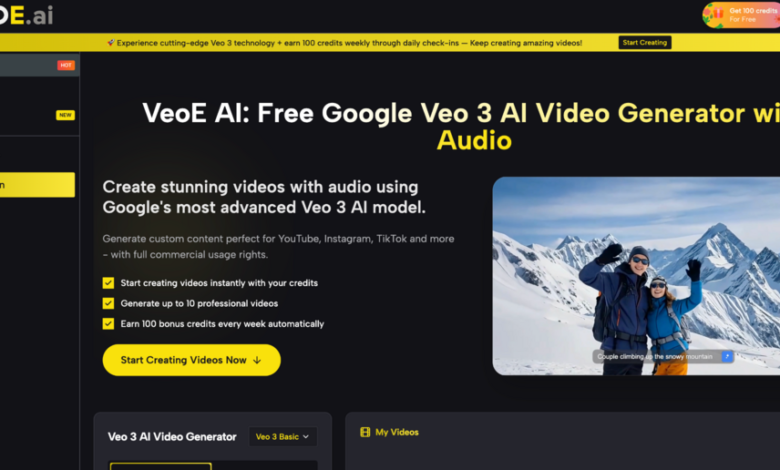
Video content now drives more engagement than any other format across YouTube, TikTok, Instagram, and beyond — yet producing it has traditionally demanded expensive software, editing skills, and significant time. That gap is closing fast. Veo 3, Google’s most advanced video generation model, has set a new benchmark for AI-produced video quality, and platforms that bring it directly to everyday creators are redefining what’s possible. VeoE AI is one of the first free tools to put Google’s Veo 3 model into your hands with no signup required and no watermarks blocking your workflow.
The Real Frustrations Creators Face with Video Production
Anyone who has tried to maintain a consistent video output knows how many things can go wrong before a single frame is published.
- Time drain: Writing scripts, recording, editing, and color-correcting a single video can consume an entire workday — even for a 60-second clip.
- Technical skill gap: Most capable editing tools have steep learning curves. Creators spend hours learning software instead of making content.
- Audio complexity: Syncing dialogue, ambient sound, and background music into a cohesive output is one of the hardest parts of video post-production.
- Cost of production: Hiring editors, voiceover artists, or motion designers adds up fast, especially for small teams and solo creators.
- Iteration bottleneck: Testing multiple creative directions means going back through the entire production pipeline each time.
Core Features of VeoE AI’s Veo 3 Video Generator
Veo is a free online platform built directly on Google’s Veo 3 API, giving creators cinematic-quality video output alongside a set of genuinely differentiated tools that go well beyond basic generation. Here is what makes it stand out in practice.




Google Veo 3 & 20+ AI Models Under One Dashboard
Most free AI video tools lock you into a single model. VeoE AI takes the opposite approach: 20+ leading AI video models are bundled into one interface — including Google Veo 3, Veo 3.1, ByteDance Seedance 2 and Seedance 2 Fast, Kling 3.0, Wan 2.6, Grok Imagine, and Runway Gen-4 Turbo. Creators can switch models mid-project based on whether they need cinematic quality, faster rendering, or a specific visual style — without managing multiple subscriptions or accounts. This multi-model flexibility is VeoE AI’s most structurally distinct advantage over any single-model competitor.
Smart Prompt Optimizer with Three Variations
VeoE AI includes a built-in prompt enhancement engine that rewrites vague or rough input descriptions into detailed, model-optimized prompts. It adds cinematic direction, suggested camera angles, lighting cues, and mood descriptors — then returns three refined prompt variations for the user to choose from. This means first-time users who have never written a video prompt before consistently get professional-grade results without any trial and error.
Veo 3 Prompt Hub — A Curated, One-Click Inspiration Library
This is one of VeoE AI’s most unique features and one that no comparable free tool offers: a dedicated Veo 3 Prompt Hub. It is a continuously updated, community-curated collection of premium, production-tested Veo 3 prompts — from cinematic tracking shots and product showcase sequences to atmospheric narrative scenes and stylized short films. Each prompt comes paired with an example video output so creators can see exactly what it produces. Clicking “Use It” on any prompt instantly loads it into the generator for one-click replication. This library eliminates the single biggest barrier for new users: not knowing how to write a prompt that actually works.
Three Input Modes: Text, Image, and Reference Video
VeoE AI supports Text-to-Video, Image-to-Video, and Reference-to-Video generation. Users can describe a scene in plain language, upload a photo to guide visual composition and style, or supply a reference video clip to transfer motion and pacing. All three modes can be combined in a single generation request, giving experienced creators a level of directorial control that goes far beyond what most free AI video platforms allow.
No Account Required — Free Credits on Every Visit
New visitors receive instant free credits without creating an account or entering a credit card. Registered users earn an additional 100 credits weekly through daily check-ins, creating a sustainable free-use loop. Paid plans remove watermarks and scale credit volume for heavier production use. The entry point is genuinely frictionless in a category where most tools gate access behind signup walls.
Fast Rendering Across All Quality Tiers
Generation time ranges from approximately 15 seconds (Seedance 2 Fast at 480p) to around 90 seconds for premium Veo 3.1 output — with most standard generations completing in under 60 seconds. This speed is intentional: the platform is built for iterative production workflows, not just one-off demos. Creators running ad variations or testing multiple creative directions benefit from a tool that keeps pace with rapid iteration.
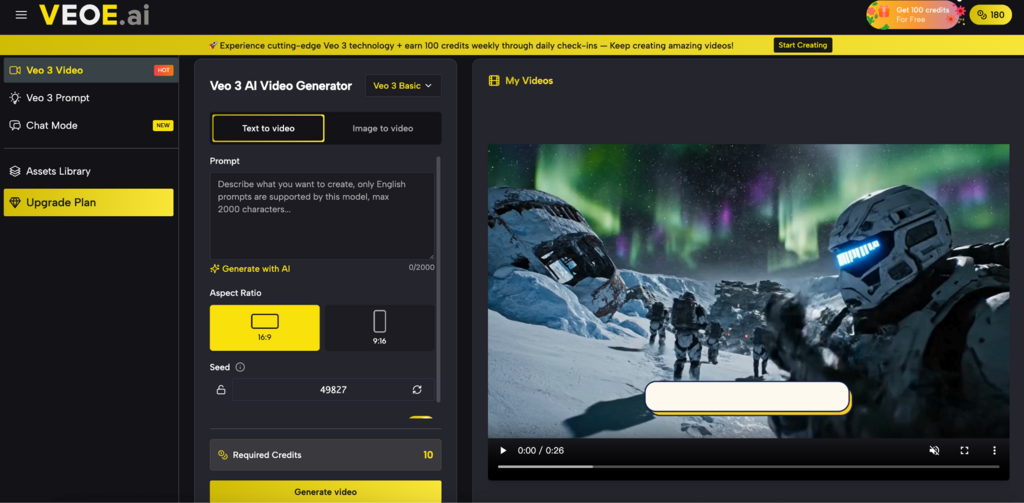
How to Generate a Veo 3 Video on VeoE AI
Step 1: Write Your Prompt or Upload a Reference
Navigate to veoe.ai and type a scene description (e.g., “A slow-motion close-up of rain falling on a city street at night, cinematic lighting”) or upload a reference image to guide the visual style.
Step 2: Let the Prompt Optimizer Enhance Your Input
Click “Generate with AI” to let VeoE’s built-in prompt engine refine your description. Review the three suggested prompt variations and select the one that best matches your creative intent.
Step 3: Choose Your Model and Settings
Select your preferred model — Veo 3 for highest cinematic quality, Seedance 2 Fast for rapid iteration — then adjust aspect ratio (16:9 for YouTube, 9:16 for TikTok/Reels) and duration.
Step 4: Generate and Download
Click “Generate Video.” Your clip renders in seconds to under two minutes with synchronized audio included. Preview the result, then download in high quality with full commercial usage rights attached.
VeoE AI vs. Other Veo 3 Video Tools
| Tool | Core Advantage | Best For | Free Access |
| VeoE AI | 20+ models including Veo 3 + native audio + Prompt Hub + no signup | All creators — social, marketing, film, education | Free credits instantly, no account needed |
| Google VideoFX / Vertex AI | Direct Google Veo access with enterprise integration | Enterprise and developer teams | Limited / waitlist-based |
| Runway ML | Advanced visual effects and fine-grained editing | Professional video editors | Limited free tier |
| Kling AI (standalone) | Strong cinematic motion and character consistency | Narrative and character-driven content | Limited free usage |
VeoE AI’s position is clearly differentiated: it is the only platform on this list that combines Veo 3 access, multi-model switching, native audio output, a curated Prompt Hub, and a genuinely barrier-free free tier — all in one place.
Conclusion
For creators who want to use Google’s most capable video generation model without navigating enterprise APIs or waiting for beta access, VeoE AI offers the most direct path available. The combination of Veo 3’s native audio output, 20+ model flexibility, a smart prompt optimizer, a curated one-click Prompt Hub, and a genuinely free starting point makes it worth trying for anyone serious about video content. Visit VeoE AI, use your free credits, and see firsthand what Veo 3-powered generation looks like in practice — no account needed to start.